
How do I look up IMD / WIMD / SIMD Deciles for my students?
IMD/WIMD/SIMD deciles 1-4 are one of our student targeting criteria and so we request that schools share the IMD decile of students on our registration form on the Hub.
How do I look up IMD/WIMD Deciles? - England and Wales
Students in England and Wales meet our postcode deprivation criteria if their home postcode falls into IMD/WIMD deciles 1-4.
You can check a student’s IMD/WIMD decile using the individual student registration page on the Hub by following these steps:
- From the Tasks page, select Register Students.
- Click Add Students, then choose Add Students Individually.
- Scroll to the bottom of the registration page and enter the student’s postcode in the Postcode field. The system will display the IMD/WIMD decile for that postcode.
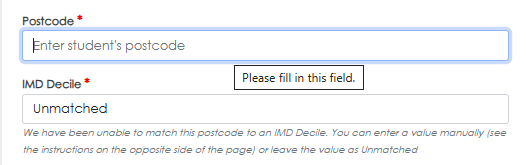
- On rare occasions, a postcode does not have an IMD/WIMD decile, this will come up as "unmatched" – you can enter these ones only as unmatched on the Hub when registering students.
How do I look up IMD Deciles? - Northern Ireland
Students meet our postcode deprivation criteria if their home postcode falls into IMD deciles 1-4. You can follow the below steps to look up IMD deciles for your students and generate a downloadable excel report:
- Go to: https://deprivation.nisra.gov.uk
- Enter the postcode into the "Postcode Lookup" tool on the website
- Scroll towards the bottom to look up the "Income Affecting Children Deprivation Domain - rank"
- Use the table below to translate the rank into a decile
| Rank | Decile |
| 1-89 | 1 |
| 90-178 | 2 |
| 179-267 | 3 |
| 268-356 | 4 |
| 357-445 | 5 |
| 446-534 | 6 |
| 535-623 | 7 |
| 624-712 | 8 |
| 713-801 | 9 |
| 802-890 | 10 |
- On rare occasions, a postcode does not have an IMD decile, this will come up as "unmatched" - you can enter these ones only as unmatched on the Hub when registering students.
How do I look up SIMD Deciles? - Scotland
Students meet our postcode deprivation criteria if their home postcode falls into SIMD deciles 1-4. You can follow the below steps to look up SIMD deciles for your students and generate a downloadable excel report:
- Download the Scottish Index of Multiple Deprivation spreadsheet: available here
- Enter your students’ postcodes on the ‘SIMD 2020v2 postcode lookup’ tab.

- You need the number from the ‘SIMD 2020v2 Decile’ column (usually Column E) to find out the decile for the postcodes to use when registering students.
- On rare occasions, a postcode does not have an SIMD decile, this will come up as "unmatched" – you can enter these ones only as unmatched on the Hub when registering students.